Integrating the Sweet Flower Font Bundle into Your Design Workflow
In the toolkit of a modern creator, efficiency and aesthetic cohesion are paramount. Whether you are a freelancer managing multiple client briefs, a small business owner developing brand assets, or a hobbyist crafting personalized gifts, the time spent searching for complementary design elements can disrupt your creative flow. The Sweet Flower Font Bundle offers a streamlined solution to this common workflow bottleneck. By packaging a bold typeface with a dedicated set of decorative doodles, this bundle removes the friction associated with mixing and matching assets from different sources, allowing you to move from concept to execution with greater speed.
Understanding the Asset Composition
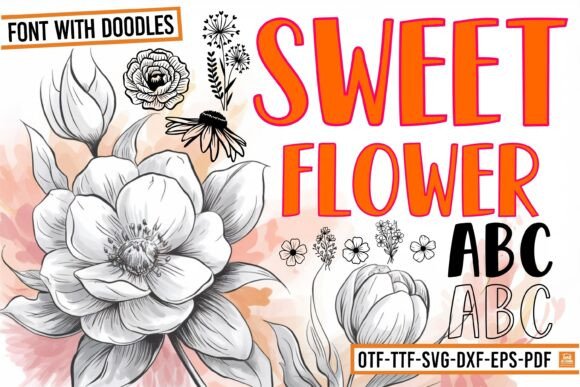
To effectively integrate any asset into your process, you must first understand its structure. The Sweet Flower bundle is not merely a collection of letters; it is a dual-purpose system designed for versatility. It consists of two distinct components: the Sweet Flower typeface and the Sweet Flower Doodles dingbat font.
The primary typeface, Sweet Flower, utilizes a mixed-case design strategy. It features bold capital letters paired with outline lowercase letters. This structural decision allows for immediate visual hierarchy without requiring manual layering or complex typesetting. The bold capitals provide weight and anchor the text, while the outline lowercase adds a whimsical, airy feel. This combination is particularly useful for headers and short phrases where you want to convey playfulness without sacrificing readability.
The secondary component, Sweet Flower Doodles, functions as a pictographic library. Instead of alphanumeric characters, each key stroke generates a hand-drawn floral illustration. These doodles are stylistically matched to the weight and curvature of the primary font. This pre-matched compatibility is a critical workflow feature; it eliminates the need for manual resizing or color correction to ensure that your text and graphics look like they belong together.
Strategic Implementation in Project Planning
When approaching a new project, the selection of typography usually occurs during the ideation or mood boarding phase. However, the Sweet Flower bundle allows you to defer specific design decisions until the execution phase, thanks to its inherent versatility. Because the assets cover both text and illustration, you can approve a general "direction" early on and finalize the specifics later.
Phase 1: Asset Preparation and Organization
Before you begin designing, a brief preparation phase ensures a smoother workflow. Once you have downloaded and installed the Sweet Flower fonts, it is helpful to create a reference sheet for the Doodles font. Since dingbat fonts rely on keyboard mapping, knowing which key corresponds to a specific flower or leaf saves significant time.
Workflow Tip: Open a text document, type out the alphabet and numbers using the Sweet Flower Doodles font, and save this as a PDF or image file within your project folder. This serves as a visual key, preventing the need to "hunt and peck" for the right graphic element while you are in the middle of a design layout.
Phase 2: Integration with Design Platforms
The Sweet Flower bundle is compatible with standard vector and raster software, but its implementation varies slightly depending on your platform of choice.
- For Vector Work (Adobe Illustrator, Affinity Designer): The most efficient way to use the Doodles is to convert the text to outlines (paths). This allows you to ungroup the floral elements and manipulate their anchor points. You can change the fill color of specific petals or scale parts of the doodle independently of the text.
- For Raster Work (Adobe Photoshop, GIMP): Keep the text layers editable until the final render. This allows you to adjust kerning (letter spacing) easily. If you need to overlay a doodle on top of a letter, use the "Warp" tool to slightly curve the floral element so it wraps around the letterform naturally.
- For Print-on-Demand (Canva, Silhouette Studio): If you are using web-based editors, the fonts work well as static elements. However, ensure that you "Flatten" or "Rasterize" the layers before exporting to prevent font substitution errors when the file is processed by a print vendor.
Practical Application: From Apparel to Stationery
The true value of the Sweet Flower bundle lies in its application across different mediums. The transition from digital screen to physical product requires attention to detail regarding scale and complexity.
Custom Apparel and Sublimation
When designing for t-shirts or tote bags, the bold nature of the Sweet Flower capitals is a significant advantage. Screen printing and sublimation often struggle with very thin lines, which can break or disappear during the heat transfer process. The thick strokes of this font ensure high legibility on fabric.
Consider a design workflow for a "Mama Bear" t-shirt. You might type "MAMA" in all caps using the bold setting, and "bear" in lowercase to utilize the outline effect. You could then place a floral doodle from the second font to dot the 'i' or create a wreath around the text. Because the bundle includes both elements, you do not need to license a separate floral graphic pack, streamlining your commercial usage rights.
Invitations and Stationery
For wedding invitations or greeting cards, the aesthetic shifts from durability to elegance. Here, the outline lowercase letters become the focal point. They allow for a "coloring" effect where the background of the paper shows through the text, creating a textured look.
Use the Sweet Flower Doodles to create borders or corner accents. A common workflow mistake is overcrowding the design with too many doodles. Instead, select three or four distinct floral elements and repeat them in a pattern. This creates visual rhythm and consistency, which is essential for professional-looking stationery.
Home Decor and Signage
Wooden signs and wall art require fonts that have a strong "presence." The Sweet Flower font holds up well at large scales. When creating a cut file for a vinyl cutter (like a Cricut or Silhouette), the mixed-case design creates a complex, interesting silhouette that is more engaging than a standard block font.
Implementation Note: If you are layering vinyl, the outline letters present an opportunity for multi-color designs. You can cut the outline letters in one color and the bold capitals in another. However, ensure your design software is set to "Weld" overlapping letters so the cutting machine creates one continuous line rather than cutting individual letters that overlap.
Optimizing for Efficiency and Consistency
For professionals and entrepreneurs, consistency is key to brand recognition. While Sweet Flower is often used for one-off projects, it can also serve as a recurring element in a specific product line.
To maintain consistency across a series of products (e.g., a set of six different motivational mugs), create a "Master Template" file. In this file, lock the position of your recurring elements—such as a specific floral arrangement in the corner or the specific color codes used for the outline letters. When you start a new design in the series, duplicate this master file rather than starting from scratch. This ensures that the "vibe" remains uniform, even as the text content changes.
Long-Term Asset Management
As your library of design assets grows, organization becomes vital. Treat the Sweet Flower bundle as a specialized tool rather than a general-purpose font. Tag it in your system with keywords like "Floral," "Whimsical," "Hand-drawn," and "Bundled Assets."
Because the doodles are accessed via keyboard strokes, remember that they are searchable text, not images. If you use these in a document or a design file, searching for the letter "A" might highlight a floral doodle if you are in the wrong font layer. Always clearly label your layers in your design files to avoid confusion during the revision process.
Compatibility and Final Quality Control
Before sending any project to print, perform a final quality control check. Zoom in on the outline letters to ensure the paths are closed and smooth. If you are using the Sweet Flower Doodles to create a complex illustration, ensure that individual elements are grouped together so they do not shift during resizing.
By viewing the Sweet Flower bundle not just as a font, but as a comprehensive design system, you can significantly reduce your production time. It provides the raw materials for a cohesive aesthetic, allowing you to focus your energy on the message and the overall composition of your work. Whether you are designing a quick gift for a friend or a commercial product line for your store, this bundle offers a structured yet creative foundation for your projects.