Integrating Quimbie: A Practical Guide to Assertive Display Typography
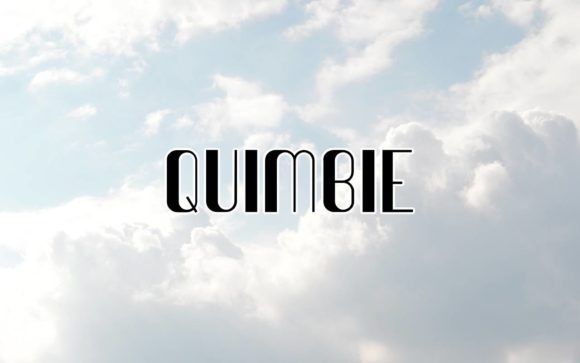
In the realm of visual communication, the choice of typeface is rarely merely aesthetic; it is a strategic decision that dictates the tone and reception of a project. Quimbie, a display font designed by Peter Wiegel, occupies a specific and valuable niche within the creative workflow. It is classified as a cool and assertive typeface, characterized by a personality that commands attention without sacrificing legibility. Understanding where and how to deploy Quimbie is essential for designers, marketers, and entrepreneurs looking to inject energy into their visual assets. This guide explores the practical integration of Quimbie into professional workflows, from initial branding concepts to final social media execution.
Understanding the Core Characteristics
Before integrating any font into a production pipeline, a technical and aesthetic assessment is required. Quimbie is not a workhorse body text font; it is a display typeface. This distinction is critical for workflow efficiency. Attempting to force Quimbie into long-form text blocks will result in visual clutter and poor readability. Its strength lies in headers, titles, and logos. The "assertive" nature of the font suggests strong lines and a confident stance, making it ideal for projects where the message needs to project authority or modernity. The "cool" aspect implies a stylistic flexibility that allows it to fit into contemporary design trends, particularly those targeting the 20–50 demographic that values sleek, professional presentation.
Pre-Project Planning and Asset Selection
The implementation of Quimbie begins in the planning phase. When mapping out a branding project or a magazine layout, the font selection process involves checking for compatibility with the project's goals. If the objective is to create a soft, vintage, or highly traditional aesthetic, Quimbie may not be the correct tool. However, for product packaging that needs to pop on a crowded shelf or a social media campaign designed to stop the scroll, it is a strong candidate.
During the planning stage, consider the following workflow steps:
- Define the Hierarchy: Decide where Quimbie will sit. It is best reserved for Level 1 headers (H1) or pull quotes. Select a contrasting, neutral sans-serif or serif font for the body copy to ensure the layout does not compete with itself.
- Audience Analysis: Verify that the assertive nature of the font aligns with the audience's expectations. For B2B corporate reports, it might be too casual. For a wedding invitation suite or a lifestyle brand, it hits the right note.
- Technical Compatibility: Ensure the font files are compatible with your primary design software (e.g., Adobe Creative Suite, Canva, Figma) to avoid bottlenecks during the execution phase.
Workflow Integration: From Concept to Execution
Once the decision to use Quimbie has been made, the focus shifts to execution. The font serves as a visual anchor. In a typical design workflow, the typography is applied after the layout grid is established but before final image selection. This allows the designer to adjust the spacing and scale of the text to accommodate the font's unique metrics.
Product Packaging and Branding
For small business owners and freelancers creating product packaging, Quimbie offers a distinct advantage in brand recall. Its assertive nature means it can often stand alone with minimal graphic embellishment. When designing a logo or package label, use Quimbie for the product name. The workflow here involves testing the font against various background textures. Because it is designed to express words above the background, it typically performs well with high contrast—think white text on dark backgrounds or bold color blocks.
A practical tip for packaging is to test the font at small scales. While it is a display font, its legibility on the side panel of a box or the bottom of a poster must be verified. If the font loses its "cool" factor when shrunk, it should strictly be limited to the primary logo lockup.
Magazine Covers and Editorial Layouts
In editorial design, the "hook" is everything. A magazine cover must communicate the theme of the issue instantly. Quimbie fits well into this environment by providing a modern edge to headlines. When integrating it into an editorial workflow, the designer typically pairs it with a stark, high-resolution photograph.
The process involves balancing the visual weight. If the cover image is busy, Quimbie’s solid structure helps the text remain readable. If the image is minimal, the font adds necessary visual interest. Consistency is key here; if Quimbie is used on the cover, it should be echoed in section dividers or pull quotes inside the magazine to create a cohesive reading experience.
Digital Presence: Social Media and Web
For marketers and content creators, the digital application of Quimbie is perhaps its most frequent use case. Social media platforms prioritize content that grabs attention in a fraction of a second. Quimbie is perfectly suited for Instagram stories, YouTube thumbnails, and Pinterest pins.
Implementation in Social Workflows
Efficiency in social media creation often relies on templates. A practical implementation strategy involves creating a library of templates in tools like Canva or Photoshop where Quimbie is pre-set as the headline font. This eliminates the decision fatigue of choosing a font for every post.
When using Quimbie for social media, observe the following:
- Spacing (Tracking): Display fonts often benefit from slightly increased letter spacing (tracking) to improve readability on mobile screens. Test Quimbie at +10 to +20 tracking for subheadlines.
- Color Contrast: Use the font to express mood through color. A neon green Quimbie on a black background creates a tech/gaming vibe, while a gold Quimbie on a navy background suggests luxury and professionalism.
- Animation: In video content, the assertive nature of the font makes it excellent for kinetic typography. Its strong shapes hold up well during motion transitions.
Wedding Stationery and Personal Projects
It is worth noting that display fonts are not exclusive to commercial enterprise. For personal projects, such as wedding invitations or event planning, Quimbie offers a contemporary alternative to traditional script fonts. In a wedding workflow, this might be used for "Save the Date" cards where the couple wants a modern, chic aesthetic rather than a formal, traditional one. It pairs well with minimalist design layouts, allowing the typography to do the heavy lifting.
Quality Control and Long-Term Use
As with any asset in a creative toolkit, the long-term utility of Quimbie depends on how well it is managed. Overuse of a single display font can lead to brand fatigue. To maintain its impact, reserve Quimbie for high-impact moments. Use it for the hero section of a website, but switch to a standard sans-serif for the navigation bar and footer.
File Management and Licensing
Peter Wiegel, the author, has a history of creating accessible typefaces. However, professionals must always verify the licensing terms of the specific version of Quimbie they are using. Ensure that the license covers commercial use if the project is for a client or a business product. Organizing font files in a central repository, labeled by style and weight, ensures that the font is readily available when a project calls for that specific "cool and assertive" energy.
Pairing Strategies
The final piece of the workflow puzzle is font pairing. Quimbie has a strong personality, so it requires a partner that can support it without competing.
- For Professional Contexts: Pair Quimbie with a clean, geometric sans-serif like Montserrat or Lato. This grounds the assertive display font and makes the layout feel structured.
- For Creative Contexts: Pair Quimbie with a monospaced font. This creates a high-contrast, editorial look often seen in fashion magazines and tech blogs.
Conclusion
Quimbie is more than just a set of vector paths; it is a tool for expression. By understanding its assertive nature and integrating it thoughtfully into the design process—from planning and pairing to final production—creators can leverage this font to elevate their work. Whether applied to the glossy cover of a magazine, the packaging of a new startup product, or the background of a social media post, Quimbie provides a reliable way to communicate confidence and style. Proper implementation ensures that the typography enhances the message, making the workflow smoother and the final product more compelling.