Atomic Summer: A Complete Guide to the Vibrant Full-Color SVG Font
In the world of digital design, typography is often the unsung hero that conveys tone, emotion, and context. While standard black-and-white fonts serve their purpose, the evolution of technology has brought us a new era of expressive text: full-color fonts. Among the most creative and visually striking examples of this technology is Atomic Summer, a unique typeface that merges the scientific precision of the periodic table with a vibrant, warm-weather aesthetic.
What is Atomic Summer?
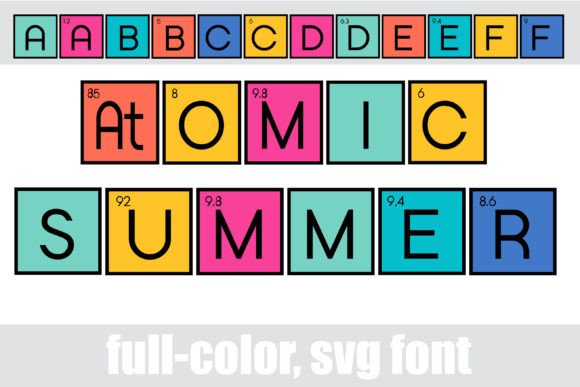
Atomic Summer is an OpenType full-color SVG font that reimagines the building blocks of the universe through a summer color palette. Unlike traditional fonts that rely on solid shapes, this font utilizes Scalable Vector Graphics (SVG) technology to embed color data and gradients directly into the font file. This allows each character to display complex colors and patterns without requiring the user to manually change the text color in their design software.
The design of the font is inspired by the periodic table of elements. It features a distinct stylistic choice regarding capitalization: the uppercase letters are designed without atomic numbers, presenting a cleaner look suitable for general headlines, while the lowercase letters include the atomic numbers, leaning heavily into the scientific aesthetic.
Unique Features and Ligatures
Beyond its colorful exterior, Atomic Summer includes several design nuances that make it a delight for typographers and designers. The font features a variety of fun ligatures—special character combinations that create unique visual effects when specific letters are typed together. For example, typing combinations like "At" or "Al" triggers special designs that mimic the look of chemical element boxes, further reinforcing the theme.
Additionally, the font package often includes an alternate case. This feature provides access to additional colors and styles that can be accessed through your system’s character map (such as the Character Map on Windows or Font Book on Mac). This expands the creative possibilities, allowing users to mix and match colors to fit specific design palettes.
Understanding Full-Color SVG Font Technology
To fully appreciate Atomic Summer, it is helpful to understand the technology powering it. Traditional vector fonts (like standard .TTF or .OTF files) are monochromatic. They define a shape, and the user selects a color for that shape. Full-color SVG fonts, however, are essentially small images or complex vector drawings embedded within the font file.
This technology allows for:
- Gradients: Smooth transitions between colors, rather than flat fills.
- Textures and Patterns: The ability to include images or complex textures within the letterform.
- Multi-Color Support: A single letter can contain multiple colors without needing layering tricks in design software.
How to Install and Use Atomic Summer
One of the most common misconceptions about color fonts is that they are difficult to install. In reality, Atomic Summer is installed just like any standard font file. You do not need special plugins or installers to get the file onto your computer.
Installation Steps
- Download the File: Ensure you have the .OTF file for the font.
- Mac Users: Open Font Book (the default font manager for macOS). You can simply drag and drop the font file into Font Book, or double-click the file and select "Install Font."
- Windows Users: Open your Control Panel and navigate to the Fonts section. Drag the file into the folder, or right-click the file and select "Install."
Once installed, the font will appear in your font lists just like Arial or Times New Roman. However, seeing the colors depends entirely on the software you are using.
Software Compatibility and Troubleshooting
The most critical aspect of working with full-color SVG fonts is understanding software compatibility. While the technology is becoming more common, not all design programs support it equally.
Programs that Support Color Fonts
Atomic Summer is fully compatible with several major design platforms. If you are using the following software, you should be able to see and utilize the colors immediately:
- Adobe Products: Photoshop, Illustrator, and InDesign have robust support for SVG fonts.
- Silhouette Studio: This is a key compatibility point for crafters. Atomic Summer works exceptionally well in Silhouette Studio, making it perfect for vinyl cutting and scrapbooking projects.
- QuarkXPress: A staple in the publishing industry that supports color font technology.
- Inkscape: The popular free, open-source vector graphics editor also supports these fonts.
The "Black Text" Issue
A common misunderstanding occurs when users open a color font in a program that does not support SVG technology. Please note that color fonts will show as black in non-compatible programs. If you are using an older version of software or a text editor that only reads standard vector data, the program will ignore the color information and default to rendering the outline in black.
Furthermore, even in programs that do support color fonts, they often show as black when choosing the font in the preview window. This is normal behavior. You will know if your program can support the color data when you type onto the actual document canvas. If the text appears in the vibrant summer palette on the canvas, your software is compatible. If it remains black on the canvas, the software cannot render the SVG data.
Creative Applications: Where to Use Atomic Summer
Because of its distinct visual style, Atomic Summer is not a font meant for writing long paragraphs of body text. Its purpose is to grab attention and convey a specific theme.
Best Use Cases
- Titles and Headers: Use it to make blog post titles or magazine headers pop off the page.
- Posters and Displays: The high-impact colors make it ideal for science fair posters, summer event flyers, or retro-themed party decorations.
- Branding: If you are designing a logo for a science podcast, a chemistry tutor, or a summer camp, this font provides an instant thematic connection.
- Crafting and Vinyl Projects: For users of Silhouette Studio, this font is perfect for creating stickers, t-shirt designs, and tote bags where a multi-color design is desired without the hassle of layering different vinyl colors.
Tips for Designing with Color Fonts
To get the most out of Atomic Summer, consider these design tips:
1. Contrast is Key: Because the font contains multiple colors, ensure your background is relatively simple. A busy background can clash with the "summer" palette and make the text unreadable. Solid colors or subtle textures work best.
2. Size Matters: Full-color SVG fonts often contain fine details. Display them at larger sizes where the colors and atomic numbers can be clearly discerned. Using them at very small sizes may cause the colors to look muddy or the details to be lost.
3. Mix with Neutral Fonts: Pair Atomic Summer with a clean, sans-serif font for your body text. This creates a visual hierarchy that is pleasing to the eye—the bold, colorful header draws the reader in, while the clean body text ensures readability.
Conclusion
Atomic Summer represents the intersection of science, art, and modern font technology. By leveraging the power of full-color SVG files, it offers designers a ready-made solution for vibrant, themed typography. Whether you are a professional graphic designer using Adobe Illustrator or a hobbyist creating decals in Silhouette Studio, this font provides a unique tool to brighten up your projects. Understanding how to install it, where to use it, and how to troubleshoot compatibility issues will ensure that your designs always display the full, colorful spectrum intended by the creator.